AMI Play
- 4.6
- Rating
- 1.00M
- Installs
- Free
- Price

 Analysis by App-foxy
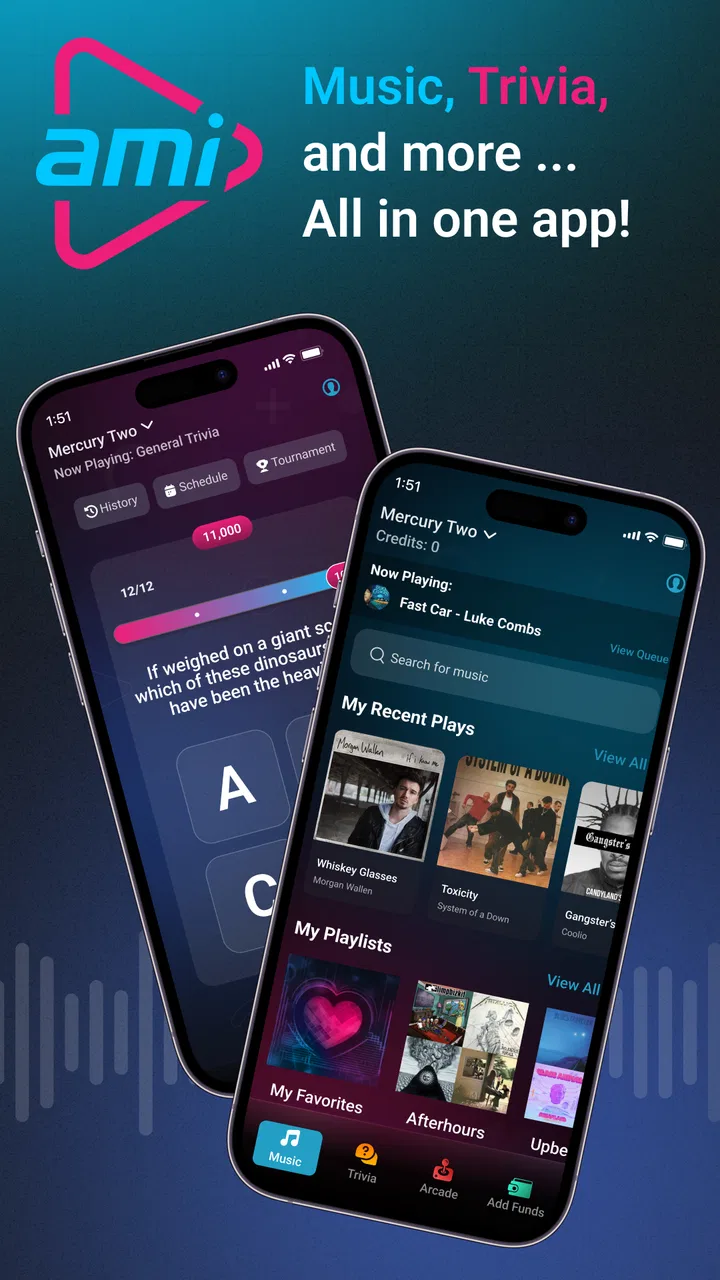
AMI Play is the kind of music and entertainment app that makes sense when you are physically spending time at a venue that uses AMI equipment. I found its purpose much narrower than a normal streaming service, but also more practical in that setting: it lets you control music, take part in trivia, and pay for arcade games connected with AMI venues. That focus is important, because this is not an app I would install expecting a personal music library, offline listening, or a replacement for a subscription service.
In my experience, the main appeal is convenience. Instead of treating the venue’s music system as something controlled only from a cabinet or jukebox, the phone becomes part of the experience. The app is free to download, and its content rating is Everyone, so it is approachable for a broad audience. The actual usefulness depends on being somewhere with compatible AMI entertainment equipment, which makes the location more important than the app’s feature list.
How AMI Play works in a real venue
The first thing I would explain to a friend is that AMI Play is a companion app, not a standalone audio player. Its developer is AMI Entertainment Network, and the app is built around interaction with AMI venues. When the surrounding equipment supports it, the phone can be used to control music or join venue activities rather than simply playing sound directly to the handset.
You May Also Like

 Blood Strike: 2.5 Anniversary
Blood Strike’s Loadouts Turn Every Drop Into a Tactical Gamble
A close look at Blood Strike’s custom loadouts: how fast access to signature weapons reshapes its battle royale rhythm, rewards preparation, and narrows the gap between fights.

 Pandora - Music & Podcasts
Pandora’s Music Is Easy to Start, but Harder to Recover
Pandora’s strength is its low-effort path from a seed to a station. Its weak spot is how much confidence it asks you to place in connection, setup, and quiet recovery.

 8 Ball Pool
 Is Built on Rivalries, Rematches, and Routine
A close look at the rivalries, rematches, shared routines, and unanswered safety questions that turn a quick pool match into a persistent mobile community.

 Samsung Music
’s Quiet Strength Is Playing What You Already Own
Its reach comes less from spectacle than from dependable access to a personal library. That simplicity is both the app’s strongest retention engine and its ceiling.

 AccuWeather: Weather Radar
AccuWeather Review: A Quick, Clear Forecast for Everyday Decisions
For everyday plans, the best forecast is the one you can understand quickly. AccuWeather makes rain timing, radar, and local conditions easy to act on, with a few trade-offs.

 Hill Climb Racing
Why Hill Climb Racing Still Turns Crashes Into One More Run
A tiny car, a bumpy hill and one more upgrade: Hill Climb Racing keeps resurfacing because its simple chaos makes every near-miss feel personal.
More From Our News Desk
View All News


That distinction prevents a common misunderstanding. If you are looking for music to enjoy while walking, commuting, exercising, or relaxing at home, this is the wrong category of tool. A conventional streaming app gives you direct access to tracks wherever you are. AMI Play is more like a remote and activity pass for a particular social environment.
The music-control function is most useful when a group cannot agree on what should play next. Instead of leaving one person to manage the venue’s music system, several people can participate from their phones, depending on how the local AMI setup is configured. I like that idea because it turns music selection into part of the outing rather than a background task handled by staff or a single friend.
There is also a social advantage. A person who is not comfortable walking up to a jukebox or asking staff for help may find phone-based control less awkward. That can make the experience feel more immediate, especially in a busy bar, restaurant, or entertainment venue. The app does not need to become the center of attention; it quietly gives people another way to interact with what is already happening around them.
Music control is useful, but it is not personal streaming
The most important practical tip is to think of the app as a venue controller. Do not install it expecting to browse a private catalog, save albums for later, or continue listening after you leave. Its value begins when you are near the supported AMI equipment and falls sharply outside that context.
This also changes how I judge the interface. A good session should be quick: open the app, connect with the venue experience, choose an available action, and return to your conversation. If you need a long setup process every time, the convenience advantage becomes weaker. For that reason, I would keep the app ready before trying to make a song request or join trivia, rather than waiting until the group is already impatient.
Another useful habit is confirming that you are interacting with the intended venue system before committing to an action. In a crowded place, several entertainment areas may be close together, and a rushed tap can be frustrating if it affects the wrong activity. I would take a moment to check the venue context shown in the app before selecting music or paying for an arcade game.
Trivia adds a different kind of value
Trivia gives AMI Play a broader role than a simple remote control. Music selection is usually about managing the atmosphere, while trivia gives people something to do together. That makes the app more appealing for groups who want a light activity without committing to a full board game or a separate trivia night.
I see this as especially suitable for casual gatherings. A few friends can use a quiet period in their outing to compete, compare answers, and keep the conversation moving. It is also a better fit for people who enjoy short bursts of entertainment than for users searching for a deep, long-form game with extensive progression.
The trade-off is that the experience is tied to the venue’s available setup. The app’s presence on your phone does not guarantee that every nearby location will offer the same interaction. In practice, I would treat the venue itself as part of the product. Before planning an entire evening around trivia, check that the place you are visiting actually supports the AMI experience you want to use.
Arcade payments make the phone part of the transaction
AMI Play can also be used to pay for arcade games at AMI venues. That is a meaningful convenience when you are already carrying a phone but do not want to deal with a separate payment method for each play. It can make spontaneous gaming easier, particularly when a group decides to try an arcade machine after arriving for food or music.
At the same time, payment-related features deserve a little more attention than ordinary music controls. I would make sure I am selecting the correct machine or venue action before confirming anything, and I would avoid tapping through screens casually while someone else is holding the phone. The advantage is speed, but speed is only helpful when the surrounding details are clear.
This is also where the app’s value becomes more situational. A person who never visits AMI venues will receive almost nothing from the arcade-payment function. Someone who regularly spends money on arcade games in those locations may find it more useful than a music-only companion app because it combines several venue activities in one place.
Cost, value, and the limits of “free”
AMI Play itself is free to download, which makes trying it low-risk. That is the clearest cost fact, but it should not be confused with unlimited free entertainment. The app supports venue activities, and some of those activities can involve payment, particularly arcade games. In other words, the application has no stated download price here, while the activities accessed through it may still be part of a paid outing.
I appreciate that distinction because it keeps the value assessment honest. Free access is useful when you are already visiting a compatible location, but it does not turn a venue’s music, trivia, or arcade experiences into a completely cost-free service. I would see the app as a free tool that can help manage or unlock parts of an existing outing, not as a free substitute for every entertainment option.
The best value comes from combining functions. If you only want to control music once, the benefit may be modest. If you can also join trivia and use the phone for arcade payments during the same visit, the app becomes more worthwhile because one installation supports several parts of the experience. That bundled convenience is more persuasive to me than any single feature by itself.
There is no reason to pay for a conventional music subscription just to use AMI Play’s venue controls, and I would not compare the app to a premium streaming plan on that basis. The two products solve different problems. A streaming subscription is about personal access and continuity; AMI Play is about participating in a shared physical environment.
Compared with using the venue’s jukebox or arcade interface directly, the app may save small amounts of effort and make participation more social. Compared with a dedicated trivia app, its strength is not necessarily depth but connection to the venue. Compared with a mobile wallet, its purpose is not general payment management but payment interaction within AMI entertainment settings. Those comparisons help clarify where the free download has genuine value.
What I would check before relying on it
I would install the current version, which is 5.1.3, before heading out rather than waiting until I am standing beside a machine. The minimum operating-system requirement is 12, so anyone using an older device should check compatibility first. This is a small preparation step, but it matters when the app is intended for quick use during a social outing.
I would also keep expectations realistic about connectivity and venue support. The app’s functions are designed around AMI equipment, so the experience is not equivalent to opening a normal music app anywhere. If the venue does not provide the relevant AMI interaction, there may be little for the app to do during that visit. That is not a flaw in the concept, but it is a limitation in everyday planning.
A further tip is to decide who in the group will manage shared actions. If everyone is trying to control music at once, the social feature can become confusing rather than convenient. Agreeing on a simple turn-taking approach works better than treating the phone as a private remote that everyone can use simultaneously without coordination.
Who will get the most from it?
AMI Play is a good match for people who frequently visit bars, restaurants, arcades, or other locations equipped with AMI entertainment systems. It is particularly useful for groups that enjoy choosing music together, adding trivia to a casual night out, or playing arcade games without handling a separate payment process at every step.
I can also recommend it to someone who likes spontaneous plans. Imagine meeting friends for dinner and discovering that the venue has an AMI jukebox and arcade games. Rather than downloading several unrelated tools or leaving one person to operate everything, the app can bring those interactions into one phone-based experience. The benefit is not dramatic in isolation, but it can make the evening feel smoother.
It may also suit families and mixed-age groups because the content rating is Everyone. That does not mean every venue activity will appeal equally to every person, but the app itself is not positioned as an adults-only product. A group can use the music and trivia elements selectively, while arcade play gives younger or more game-focused visitors another reason to participate.
People who should skip it are those seeking an everyday music player. If your priority is playlists, albums, offline playback, artist discovery, or listening through headphones wherever you go, a dedicated streaming or local-audio app will be much better. The same applies to serious trivia fans who want extensive question libraries, detailed statistics, or long-term progression; AMI Play’s venue role is more important than any standalone-game identity.
I would also skip it if you rarely visit compatible venues. A free app still takes storage, attention, and occasional maintenance. Without regular access to AMI equipment, the download may sit unused. In that situation, the usual alternative—using the venue’s own controls or choosing a general-purpose entertainment app—will probably be more practical.
My verdict after weighing the trade-offs
AMI Play succeeds because it stays focused on a specific situation. It connects music control, trivia, and arcade payments to AMI venues, giving a phone a useful role during a night out. I like the idea of reducing friction between the group and the entertainment system, especially when the alternative is waiting for staff, sharing one cabinet, or abandoning an activity because payment feels inconvenient.
Its weakness is the same thing that gives it purpose: it is dependent on the venue. Outside that environment, it has little reason to remain open, and it should not be judged like a full music service or a general mobile game. The free download makes experimentation sensible, but the real value comes only when the supported equipment and your plans line up.
The app has a 4.5 average from around 63 thousand ratings, with more than 1 million installs, which suggests that many users find the concept worthwhile. I would treat those figures as evidence of interest rather than a guarantee that every venue visit will be seamless. The experience still depends on local equipment, your phone’s compatibility, and whether your group actually wants to use the available activities.
My recommendation is straightforward: install AMI Play if you regularly spend time at AMI venues or already know you will be visiting one. Use it as a shared entertainment companion, prepare it before arriving, and remember that the download being free does not make every venue activity free. If you want music and games that work independently of a physical location, choose a standard streaming service, trivia game, or payment tool instead.
For the right audience, AMI Play is a practical venue companion rather than a general-purpose entertainment app. I would keep it on my phone for compatible nights out, but I would not recommend it as an everyday music or gaming download. Its value is specific, its cost of access is low, and its usefulness is strongest when the app, the venue, and the group’s plans all meet at the same time.
FAQs for AMI Play
01What is AMI Play and what features does it offer?
AMI Play is an innovative gaming app designed for both Android and iOS platforms, offering a diverse range of interactive games. It features high-quality graphics, engaging gameplay, and a user-friendly interface. The app regularly updates with new games and features, ensuring users have a fresh experience each time they log in.
02Is AMI Play free to download and use?
Yes, AMI Play is free to download on both Android and iOS devices. While the app offers a wide variety of free games, there are optional in-app purchases available. These purchases can enhance gameplay by unlocking additional features or removing ads, but they are not necessary for enjoying the app.
03How does AMI Play ensure user data security?
AMI Play prioritizes user privacy and data security. The app employs advanced encryption methods to protect personal information and adheres to strict privacy policies. Additionally, the app undergoes regular security audits to ensure compliance with industry standards and safeguard users' data from unauthorized access.
04Are there any age restrictions for using AMI Play?
Yes, AMI Play is designed for users aged 13 and above. The app includes various games suitable for teenagers and adults, ensuring age-appropriate content. It is recommended that parents supervise younger users to ensure they are accessing games and features suitable for their age group.
05Can I play AMI Play games offline?
While AMI Play requires an internet connection to download games and access some features, many games within the app can be played offline. This allows users to enjoy their favorite games without needing a constant internet connection, making it ideal for travel or areas with limited connectivity.
Pros
- User-friendly interface enhances navigation.
- Wide range of customizable settings.
- High-quality audio streaming available.
- Supports offline playback for convenience.
- Continuous updates with new features.
Cons
- Limited free version features.
- Occasional ads interrupt usage.
- Requires stable internet for streaming.
- Large app size can affect storage.
- Some features need a paid subscription.

AMI Play
Gallery